Remote assistance with AR
What AR Remote Assistance Is and Why Businesses Adopt It
AR remote assistance lets an expert see a problem through a live camera and add visual instructions to the user’s screen. Businesses use it to resolve cases sooner, limit travel and downtime, improve first-time fix rates and share specialist knowledge across sites.
In brief
What Does AR Remote Assistance Mean?
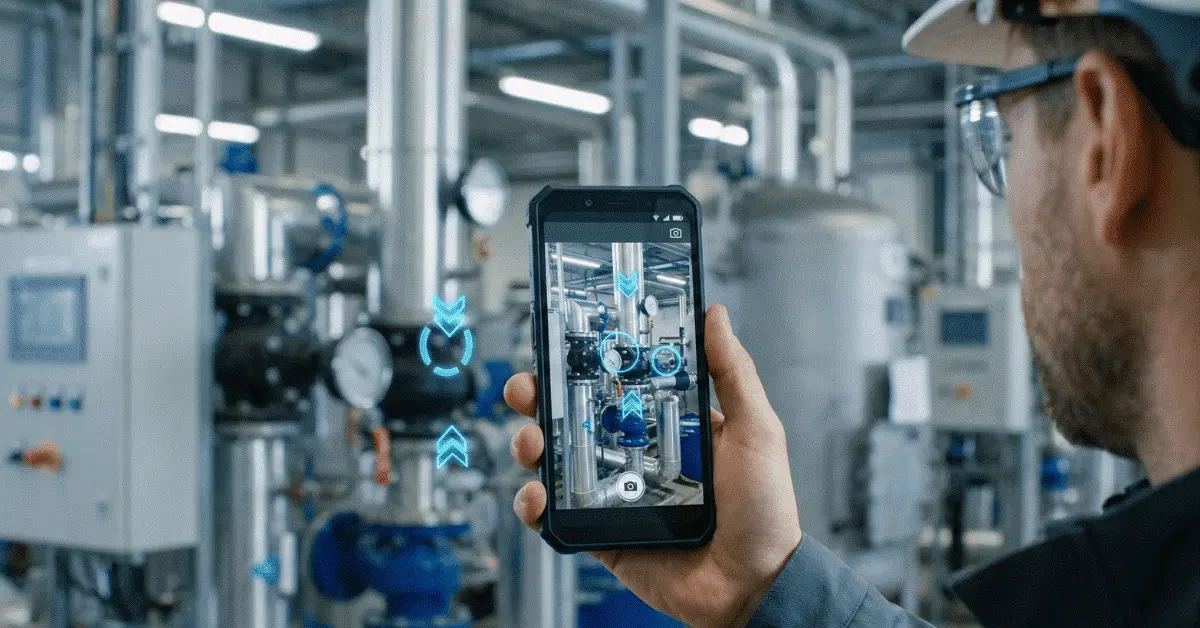
AR remote assistance adds visual guidance to live video support. The remote expert follows the on-site camera view and places arrows, markers, drawings or other instructions on the user’s screen.
A camera feed becomes a shared workspace under this technology. As a technician presents a machine, panel, pipe system, device, or site, the expert can pinpoint the precise component and indicate the next action. Rather than depending on descriptions alone, both people operate from the same visual context.
Put simply, the problem receives expert guidance without requiring the expert to travel to the site. Physical, urgent, hard-to-describe issues—or ones sitting far from the person best qualified to solve them—are where this helps most.
Value for the business
Why AR Remote Assistance Is Being Adopted by Businesses
Shorter resolution times and more issues closed without an expert visit are why businesses adopt AR remote assistance. Verbal descriptions are what phone calls depend on, and although a standard video call can show the problem, it offers no precise way to mark the user’s next step.
Instructions become visual, which is how AR remote assistance addresses that gap. Circling a component, drawing an arrow toward a control, or placing a marker over the part that should be inspected are all options for the expert. Confusion drops, and the person on-site can act with more confidence.
Reducing equipment downtime, lowering travel costs, improving first-time fix rates, supporting less experienced workers, and making expert knowledge available across multiple locations rank among the main reasons businesses adopt AR remote assistance.
The process
Live Video That Becomes Visual Guidance
Opening a support session on a phone, tablet, or smart glasses is how a worker, technician, inspector, or customer typically begins an AR remote assistance session. The live camera feed then becomes visible once the remote expert joins.
Step-by-step guidance becomes possible as soon as the connection is in place. Visually marking the exact connector replaces phrases such as “look near the small connector on the left.” Complex equipment, differing terminology between teams, or a user who is not fully trained on the asset make this especially valuable.
Simple workflows work best: see the issue, guide the user, verify the action, then decide whether to resolve, escalate, or document the case.
Workflow in GuideMeAR
See It, Guide It, Then Verify
- 1
View the problem
A live camera view from the on-site user lets the expert understand the real environment.
- 2
Use AR to guide
Arrows, drawings, or visual markers are added by the expert so attention lands on the right object or action.
- 3
Confirm the result
Once the completed step is shown, the expert can confirm the outcome or escalate if needed.
Primary advantages
Main Benefits That AR Remote Assistance Delivers
Reduced downtime is the first major benefit. Production, service quality, or customer satisfaction can be affected by every minute after equipment fails. Connecting with experts faster and diagnosing issues without waiting for travel is what AR remote assistance helps teams do.
Lower support cost is the second benefit. Remote experts can support multiple locations in the same day rather than sending senior specialists to every site. Travel, scheduling delays, and operational overhead all decline as a result.
Better knowledge transfer is the third benefit. In real time, experienced workers can guide newer employees, showing them what to inspect and how to complete a task safely. Field service, manufacturing, utilities, telecom, construction, and other industries with distributed teams find this valuable.
Typical uses
Places Where AR Remote Assistance Gets Used
Maintenance teams in manufacturing rely on AR remote assistance to troubleshoot machines, inspect production lines, and support equipment commissioning. Visual checks can be walked through by a remote expert so a technician does not have to pause work for an on-site visit.
Technicians in field service finish repairs faster and cut repeat visits with it. Should an unfamiliar issue appear, a specialist can enter the session and deliver visual instructions right away.
Inspections, installations, safety checks, and complex troubleshooting across distributed locations are supported by AR remote assistance in telecom, utilities, construction, and facility management.
Putting it in place
Introducing AR Remote Assistance in Practice
Begin with one clear business case when you introduce AR remote assistance. Pick a recurring issue where visual guidance could trim delays, raise accuracy, or stop unnecessary travel.
Who may start a session, who may join as an expert, what data is stored, how consent is handled, and when the session should be escalated all need to be defined before you expand. Real outcomes—not only the number of calls made—should be what a successful pilot measures.
Time to resolution, repeat visits, downtime, travel avoided, user effort, escalation rate, and whether the issue was solved correctly the first time are useful metrics.
Making the call
When Does AR Remote Assistance Pay Off?
Visual, distributed, time-sensitive, or expert-dependent support problems are when AR remote assistance is worth considering. Help identifying what to do next, while the person on-site can already show the problem, is a particularly strong fit.
A simple written instruction, an automated workflow, or information that already exists clearly in a system record makes it less useful. Using AR for every support case is not the goal. Using it where visual guidance creates a better outcome is the goal.
Studies and guidance
Additional Reading
- Industrial XR: Fulfilling Human Potential in Smart Factories National Institute of Standards and Technology
- Effects of XR-Based Training in Manual Assembly Tasks Human Factors / PubMed Central
- Guide to Enterprise Telework, Remote Access, and BYOD Security National Institute of Standards and Technology
Common questions
AR Remote Assistance Questions
What does AR remote assistance mean?
A remote expert can steer someone through a live camera view with AR remote assistance, using augmented reality annotations such as arrows, drawings, and visual markers.
What leads businesses to use AR remote assistance?
Downtime, travel costs, first-time fix rates, and faster access to expert knowledge for frontline workers are why businesses use AR remote assistance—cutting the first two, raising the third, and speeding the fourth.
Are smart glasses required for AR remote assistance?
No. Standard smartphones and tablets are enough for many AR remote assistance solutions, so teams that do not want to invest in specialized hardware immediately can still adopt more easily.
What industries gain from AR remote assistance?
When remote experts need to guide on-site workers visually, manufacturing, field service, telecom, utilities, construction, logistics, facility management, and healthcare can benefit.
See AR Remote Assistance With GuideMeAR
Live video and clear AR annotations come together in GuideMeAR so experts can guide workers remotely, cut confusion, and close problems faster without requiring specialized hardware.