Remote assistance that is guided
Guided Remote Assistance: A Practical Guide to Solving Problems Faster
Guided remote assistance combines live video, AR annotations and an expert’s instructions to help technicians, field workers and customers resolve problems. Both people can refer to the same view and work through the steps together, with more context than a phone call, a photo or a general video meeting provides.
At a glance
What Does Guided Remote Assistance Mean?
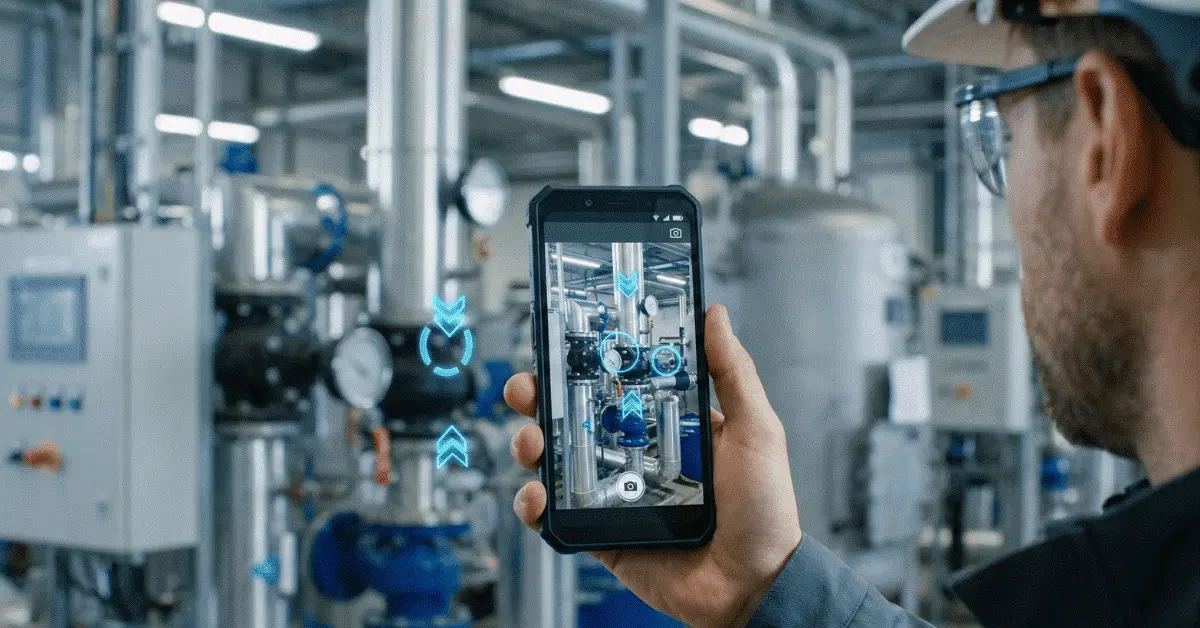
In a guided remote assistance session, the person on site shares a camera view from a phone, tablet or smart glasses. A remote expert watches that view and gives instructions as the work happens.
The guidance layer is what separates guided remote assistance from a normal video call. Arrows can be drawn, components circled, areas highlighted, or visual markers placed directly on the live video feed through augmented reality annotations. Because the user can see exactly what the expert is talking about, instructions become easier to understand.
Imagine a field technician in front of a CNC machine starting a remote assistance session after production stops. The machine is visible to a remote specialist, who can point to the sensor that needs inspection, walk the technician through the check, and confirm the result before the line returns to operation.
Where it breaks down
Why Remote Support the Traditional Way Is Slow
Descriptions are what traditional remote support often depends on. A loose cable may be mentioned by a technician, a blurry photo may arrive from a customer, or someone may be asked by an expert to check “the connector on the left side.” That can suffice in a simple situation. Confusion can appear in a complex environment.
The problem stays unseen on a phone call, even though the call itself is fast. More detail arrives through emails and photos, yet those channels are slow and quickly become outdated as the user continues working. The environment is visible on a standard video call, but tools for precise visual instruction are usually missing.
That friction shrinks with guided remote assistance. Marking the correct component on the screen replaces explaining every location verbally. Uncertainty gives way to action more quickly for the person on-site.
The process
A Support Call That Becomes a Guided Workflow
Help is usually requested by a worker, technician, or customer to open a guided remote assistance session. After joining, the expert views the live camera feed and has the user show the surrounding context before any instructions are given.
AR guidance can be added once the problem is visible. An arrow toward a switch, a circle around a damaged part, a highlight on a label, or a request to move closer to a specific area may all appear. One action is performed at a time, and the result is shown back to the expert.
Start the session, share the live view, add visual guidance, complete the action, and verify the outcome: that is the practical workflow. Focus stays on the session, and remote support is less likely to become a long, unclear conversation.
Workflow in GuideMeAR
See, Guide, Solve, Then Verify
- 1
Open a session
A live support session is opened from a mobile device by the on-site user, who then shows the real environment.
- 2
Apply visual guidance
AR annotations, arrows, and markers are used by the remote expert to show exactly what the user should inspect or adjust.
- 3
Fix the problem
Clear step-by-step instructions are followed by the user while progress is monitored by the expert in real time.
- 4
Confirm the result
The final state is confirmed by the expert, who then closes the case or escalates it with better visual context.
Impact on the business
Concrete Business Benefits of Guided Remote Assistance
Faster problem resolution is the biggest benefit. Less time is spent describing the issue and more time is spent fixing it once the expert can immediately see the issue and guide the user visually.
Travel costs can fall as well with guided remote assistance. Every location does not need a physical visit from senior experts. Several sites can be supported by one specialist in the same day, which matters for manufacturers, field service companies, utilities, telecom providers, and distributed operations teams.
First-time fix rates improve too. Real-time support can reach a technician who encounters an unfamiliar issue during the first visit, rather than leaving the site, waiting for escalation, and returning later with another expert.
Knowledge transfer is another important benefit. While solving real problems, junior workers can learn directly from experienced experts. Dependency on a small group of specialists can shrink over time as a result.
Typical uses
Where Guided Remote Assistance Makes the Biggest Difference
Teams in manufacturing use guided remote assistance to troubleshoot machines, inspect production equipment, support commissioning, and cut downtime when a specialist is not available on-site.
HVAC, electrical, mechanical, and equipment repairs can be completed by technicians in field service with support from remote experts. Repeat visits can drop and customer satisfaction can rise.
Technicians working on network infrastructure, fiber installations, cabinets, towers, and communication equipment can be guided by remote experts in telecommunications.
Inspections, maintenance, power infrastructure troubleshooting, and remote support for distributed assets are supported by guided remote assistance in utilities and energy.
Site checks, installation verification, issue reporting, and coordination between office experts and field teams can all use visual guidance in construction and facility management.
Side-by-side
Guided Remote Assistance Compared With Standard Video Calls
General communication is where standard video calls are useful, yet they were not designed for technical field support. Structure and visual tools that help experts give clearer instructions are what guided remote assistance adds.
| A standard video call | Guided remote assistance |
|---|---|
| Verbal directions carry most of the load | Visual annotations and AR markers are used |
| Complex instructions are easy to misunderstand | The exact place to look or act is shown |
| General conversation is the best fit | Technical support and troubleshooting are the design goal |
| A dedicated workflow for verification is missing | Step-by-step guidance and confirmation are encouraged |
Putting it in place
Implementing Guided Remote Assistance
One practical use case is the place to start. Pick a support problem that is frequent, visual, and costly when delayed. Equipment troubleshooting, installation support, maintenance checks, or expert escalation for field technicians are good starting points.
Clear guidance from experts needs training. Context should be requested, flooding the user with too many instructions should be avoided, annotations should appear only when they improve clarity, and each important step should be verified before moving forward.
Escalation rules should be defined before rollout. Remote resolution is not right for every issue. On-site inspection, certified personnel, safety procedures, or a different support channel are required in some cases. Guided remote assistance becomes more reliable when those boundaries are clear.
Outcomes should be measured after the pilot. Average resolution time, downtime avoided, travel avoided, first-time fix rate, escalation rate, repeat visits, and user satisfaction are useful metrics.
A decision guide
When Is Guided Remote Assistance the Right Choice for a Business?
Visual, time-sensitive, or hard-to-explain-with-words problems are when guided remote assistance is most useful. Identifying the right component, sequence, or condition—while the person on-site can still perform the action—is an especially strong fit.
Simple questions that documentation, account information, error-code lookup, or a standard checklist can answer are a weaker fit. Replacing every support channel is not the goal. Using visual guidance where it creates a faster and more accurate result is the goal.
Studies and guidance
Additional Reading
- Industrial XR: Fulfilling Human Potential in Smart Factories National Institute of Standards and Technology
- Effects of XR-Based Training in Manual Assembly Tasks Human Factors / PubMed Central
- Guide to Enterprise Telework, Remote Access, and BYOD Security National Institute of Standards and Technology
Common questions
Guided Remote Assistance Questions
What does guided remote assistance mean?
Video, voice, and visual guidance such as AR annotations, arrows, and markers are how a remote expert helps an on-site user solve a problem in a live guided remote assistance workflow.
Is guided remote assistance identical to AR remote assistance?
A close relationship exists between them. Live AR annotations are usually what AR remote assistance refers to as a technology, while the practical support workflow built around that technology is what guided remote assistance describes.
What devices does guided remote assistance need?
Standard smartphones and tablets are enough for many guided remote assistance solutions. Hands-free work can benefit from smart glasses, yet they are not always required.
Which teams gain the most from guided remote assistance?
Field service teams, maintenance departments, manufacturing teams, telecom technicians, utility workers, construction teams, and customer support teams can benefit when visual guidance helps resolve problems faster.
How should success be measured by businesses?
Resolution time, downtime avoided, travel avoided, first-time fix rate, repeat visits, escalation rate, and user satisfaction should be measured by businesses before and after implementation.
Close Problems Sooner With GuideMeAR
Live video becomes guided visual support in GuideMeAR through AR annotations, remote expert collaboration, and simple workflows that help field workers resolve problems faster.