Mobile-First Remote Assistance, Explained
Mobile-First Remote Assistance Built for Small Businesses
Using the smartphones teams already carry, mobile-first remote assistance lets small businesses clear customer problems more quickly, cut visits that are not needed, raise service quality, and offer visual support.
Support for small businesses
Remote Assistance Is Not Reserved for Large Enterprises
The phrase "AR remote assistance" still makes many people picture large corporations, enterprise support centers, costly hardware, and sizable technical teams. That mental picture is easy to understand, yet it no longer matches reality.
Global manufacturers and firms with hundreds of field technicians are not the only ones who can use remote assistance. Small businesses that must resolve customer problems more quickly, cut travel that is not needed, and deliver a stronger service experience despite limited resources can treat it as a practical tool as well.
A missed appointment, a second visit, an unresolved issue, or a frustrated customer each carries weight for a small business. Inefficiency can be absorbed across a large company's bigger operation. That cushion is often missing for a small business.
Smaller teams, for that reason, can find mobile-first remote assistance especially valuable.
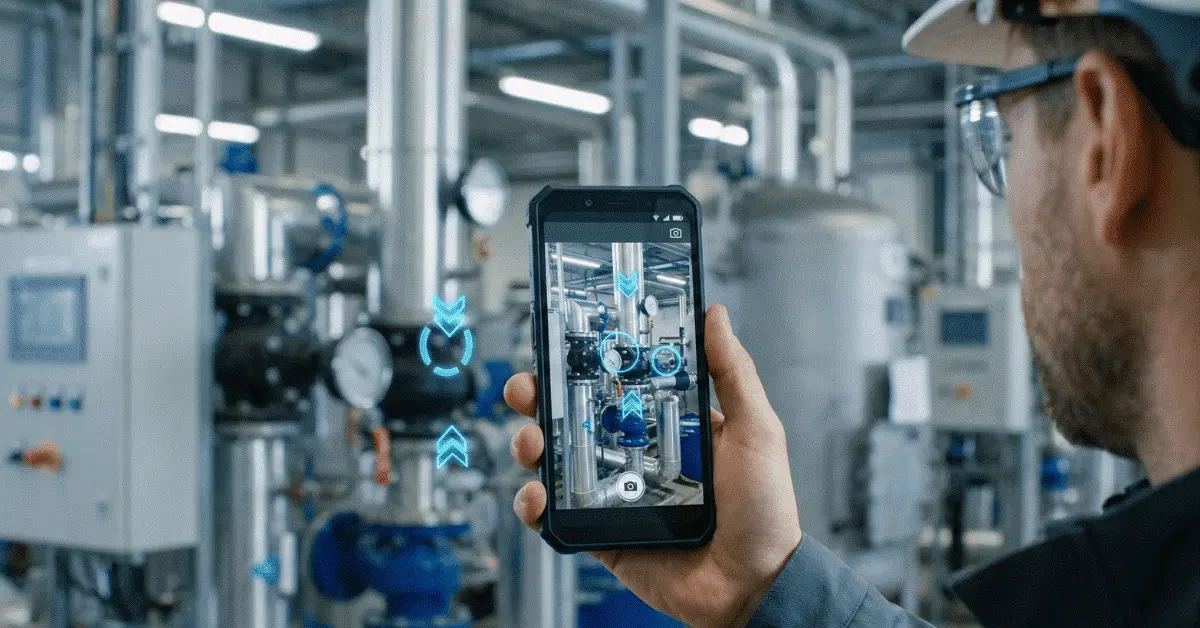
A technician, customer, or employee with a modern smartphone can send a live camera view to an expert. Arrows, drawings, markers, or AR annotations then let the expert guide them visually. Both sides look at the same situation and work through it together, rather than trying to describe the problem over the phone.
Smart glasses are not required. Special cameras are not required. A complex hardware rollout is not required.
Starting takes nothing more than a smartphone.
An operational challenge
The Support Challenge Facing Small Businesses
Larger companies with more staff, larger budgets, and broader service coverage are frequent competitors for small businesses. Smaller companies still hold advantages of their own: greater speed, a more personal touch, and more flexibility.
Support operations, however, can turn expensive in a short time.
Situations a small service company may run into include:
Operational inconveniences are not all these problems amount to for a small business. Profitability, reputation, and customer loyalty are affected directly.
Faster responses become possible for small businesses through remote assistance, without hiring more people or sending experts everywhere in person.
- After driving to a customer site, a technician discovers the issue could have been solved remotely.
- Over the phone, a customer names the wrong part, which leads to delays and confusion.
- Help from the business owner or senior technician is needed by a junior employee.
- Because the first visit did not fully solve the problem, a repeat visit is required.
- Support that takes too long leaves a customer frustrated.
A working definition
What Mobile-First Remote Assistance Means
Smartphones and tablets sit at the center of the support workflow known as mobile-first remote assistance.
The support session runs on a device customers or technicians already understand, rather than forcing them onto specialized hardware. After opening a session and sharing the live camera view, the user receives real-time guidance from someone who can help.
A basic video call lets the expert see the situation.
AR remote assistance also lets the expert guide the situation.
Such guidance may include:
Ordinary phone support or standard video calls differ from mobile-first remote assistance in this way. Practical problem-solving is what it is built for, not merely talking about the issue.
- An arrow drawn toward the correct component
- A circle around a damaged part
- An inspection point called out
- The place to connect a cable shown
- The user walked through a step-by-step process
- A check that the action was completed correctly
Ready on a smartphone
Why a Smartphone Is Enough
Expensive equipment is what many small businesses assume augmented reality requires. That assumption often held in the past. Smart glasses, headsets, custom devices, or advanced sensors were frequently linked with industrial AR.
The situation looks different today.
Already present on modern smartphones are:
AR support and remote visual assistance become practical on smartphones because of these features.
The much lower barrier to entry is why this matters for a small business. Hardware does not have to be purchased for every employee. Customers do not have to be trained on a new device. A fleet of smart glasses does not have to be managed.
The device your team already uses every day is enough to start.
- Cameras of high quality
- Processors with plenty of power
- Sensors that detect motion
- Mobile connectivity that is fast
- Touchscreens that are large
- User interfaces that already feel familiar
A competitive edge
How Small Businesses Compete with Mobile-First Remote Assistance
Being more responsive, more personal, and easier to work with is how small businesses often win customers. Those advantages grow stronger with remote assistance.
Response Times That Are Faster
Speed matters once a customer has a problem.
A remote visual inspection of the issue before anyone is sent on-site often lets your business respond faster than competitors who depend only on phone calls or scheduled visits.
Decisions a quick visual session can help you make include:
Wasted time drops, and customers feel supported right away.
- Is a remote solution possible?
- Is a technician visit required?
- Which tools or parts will be required?
- Does the issue count as urgent?
- Who on the team is best suited to handle it?
Cutting visits that are not needed
Fewer Visits That Are Not Needed
For small businesses, travel is expensive.
Fuel, technician time, scheduling capacity, and opportunity cost are consumed by every unnecessary visit. Sending someone to the site without enough information can be avoided when an issue can be diagnosed remotely.
Remote assistance still helps prepare the technician better when a visit remains required.
The right tools, the right parts, and a clearer understanding of the problem can travel with them.
The customer experience
Customer Satisfaction That Improves
Whether a business is small or large is not what customers care about. Whether their problem is solved quickly and clearly is.
Because customers can show the issue instead of trying to explain it, mobile-first remote assistance improves the experience. Frustration drops, and the support process feels more professional.
Fast visual guidance makes a customer more likely to see your business as modern, helpful, and reliable.
First-Time Fix Rates That Rise
The cost of repeat visits is high.
Profitability falls, other jobs are delayed, and customers may question your competence. First-time fix rates improve with remote assistance because technicians can reach expert support while they are still on-site.
A remote session with a more experienced colleague can start as soon as a technician encounters an unfamiliar issue. Guidance follows once the expert sees the problem, and the repair can be completed correctly the first time.
Not every employee has the same experience level, which makes this extremely valuable for small teams.
Expertise from seniors
Making Better Use of Senior Expertise
Most of the technical knowledge sits with one or two people in many small businesses. The owner, a senior technician, or a specialized employee might be the one.
Those experts are often pulled physically into every difficult case when remote assistance is missing. Bottlenecks form as a result.
Senior experts can support multiple workers or customers remotely during the day once mobile-first remote assistance is in place. Guiding others no longer always means leaving the office, workshop, or current job site.
Expertise can scale for small businesses without immediately hiring more senior staff.
Examples from practice
Practical Small-Business Examples
Repair of HVAC and Appliances
Their system is not working, a customer says. The support team starts a remote assistance session rather than scheduling a visit blindly. The unit, error display, wiring area, or filter location is shown by the customer. Whether the issue is simple, urgent, or requires a technician can then be determined by the business.
Services for Electrical Work and Maintenance
Which component needs inspection is unclear to a junior technician. Remotely, a senior technician joins, marks the correct area, and verifies the action. Faster service reaches the customer, and experience reaches the technician.
Installation of Equipment
During installation, a small company selling machines, devices, or technical products can help customers. Customers can be guided visually through key steps, instead of sending a specialist for every setup.
Support for IT and Networks
Physical setup is involved in many problems for small IT providers: routers, cables, ports, access points, printers, cameras, and local devices. The customer can show the environment through remote visual support while the expert guides them precisely.
Field Services and Construction
Progress inspections, installation checks, or help for workers facing site issues can run through remote assistance, so small contractors do not wait for the owner or project manager to arrive.
Adoption that stays easy
Why a Mobile-First Approach Matters
Ease of use is required of a remote assistance tool for small businesses.
Customers will not use a process that is complicated. Adoption will be slow if employees need special training. The investment may not make sense if hardware is expensive.
It fits into existing behavior, which is why mobile-first remote assistance works.
How to do the following is already familiar:
Importance sits in that simplicity.
Another complicated system is not what small businesses need. A tool that helps solve real problems quickly is.
- Tap open a link
- Operate a smartphone camera
- Enter a call
- Aim the phone at a problem
- Act on visual instructions
Quality of service
A Competitive Advantage Through Remote Assistance
Brand recognition and scale are how large companies often compete. Service quality is how small businesses can compete.
A better service experience is created for small businesses when remote assistance makes support:
When choosing between your business and a competitor, a customer who received quick visual help may remember that experience.
A real differentiator can form from this.
A small business can say, "Show us the problem now, and we will help you understand the next step," instead of saying, "We can send someone next week."
To the customer, that feels different.
- Quicker
- More visual in nature
- More personal in feel
- More accurate in result
- More convenient to use
Control of cost
Reducing Cost Without Reducing Service Quality
Reducing costs is a common aim for small businesses, yet cutting service quality is dangerous. Operational costs can fall through remote assistance while the customer experience improves.
Cost reductions can come from:
Replacing every physical visit is not the goal. On-site work is still required for some jobs.
Making every visit smarter and every support interaction more efficient is the goal.
- Travel that is not necessary is avoided
- Repeat visits are reduced
- Troubleshooting time is shortened
- Junior workers complete more tasks with help
- Experts support multiple cases remotely
- Job preparation improves before site visits
How GuideMeAR fits
Why GuideMeAR Works for Small Businesses
AR remote assistance should be accessible without complex hardware: that idea is what GuideMeAR is built around.
Visual support through modern smartphones and tablets is something small businesses can provide with GuideMeAR. A live camera view can be shared by customers, technicians, or field workers, while AR annotations let the expert give real-time visual guidance.
Advanced support can be delivered without investing in smart glasses, special cameras, or large enterprise infrastructure.
Help GuideMeAR can offer small businesses includes:
A more professional and responsive support experience becomes available to small teams, without becoming a large enterprise.
- Troubleshooting with customers
- Support for technicians
- Guidance during installation
- Assistance with maintenance
- Inspections done remotely
- Knowledge transfer and training
Begin on a small scale
How Starting Small Works
Transforming everything at once is not required of a small business.
One clear use case is the best way to start.
Starting points that work well include:
Use remote assistance in that one scenario first. Watch whether time is reduced, travel is avoided, customer satisfaction improves, or employees solve problems faster.
Expand to more workflows once the value is clear.
- An issue customers raise often
- An installation problem that keeps recurring
- A question technicians ask frequently
- A situation that often leads to repeat visits
- A product setup process customers find confusing
What gets measured
What Metrics to Measure
Practical outcomes, not vanity metrics, are what small businesses should measure.
Metrics that prove useful include:
Whether remote assistance is creating real business value becomes clearer through these measurements.
- How many visits did the team avoid?
- How many problems reached a remote solution?
- By how much did repeat visits fall?
- How much time did technicians save?
- How soon did customers receive help?
- Did satisfaction among customers improve?
- With guidance, did junior employees complete more tasks?
A look ahead
Visual Support Is the Future for Small Businesses
Fast, convenient, and clear support is what customers increasingly expect. Waiting days for a simple answer is not what they want. Describing a technical problem over the phone is not what they want if they can simply show it.
This expectation is matched by mobile-first remote assistance.
Modern support without large budgets or complex systems becomes a practical option for small businesses.
Visual support will become a normal part of how small businesses communicate with customers and field workers as smartphones continue to improve.
Solving issues faster and delivering a better service experience can help the businesses that adopt it early stand out.
In closing
Final Thoughts
Large companies with big teams and enterprise budgets are not the only ones AR remote assistance is for.
Customer satisfaction can improve, support costs can fall, issues can be solved faster, and competition can be more effective when small businesses use mobile-first remote assistance.
Visual guidance, remote expert support, and AR-assisted troubleshooting can be provided with modern smartphones and without specialized equipment.
This is more than a technology upgrade for small businesses.
Better service, protected profitability, and a stronger customer experience can be delivered this way.
Questions people ask often
Mobile-First Remote Assistance Questions for Small Businesses
Can small businesses use AR remote assistance?
Yes. Unnecessary visits can fall, troubleshooting can move faster, and customer satisfaction can improve without large teams, which is why AR remote assistance can be very useful for small businesses.
Is special hardware required for mobile-first remote assistance?
No. Smart glasses, special cameras, or dedicated AR devices are not required for modern smartphone-based remote assistance to work.
In what ways can remote assistance lower costs for small businesses?
Travel can be reduced, repeat visits avoided, support calls shortened, and experienced employees can guide others remotely.
Are customers able to use remote assistance if they lack technical knowledge?
Yes. Sharing a camera view and following simple visual guidance from the support expert is all a customer needs.
Which kinds of small businesses can benefit?
Benefit is available to HVAC, appliance repair, IT support, equipment installation, maintenance services, construction, telecom, facility services, and many other small technical service businesses.
In what ways does GuideMeAR help small businesses?
Live video guidance and AR annotations on standard smartphones let small businesses use GuideMeAR so teams and customers can solve issues faster without complex hardware.
Give Your Team Mobile-First Remote Assistance
On standard smartphones, GuideMeAR gives small teams live video and AR annotations so customers and technicians can solve problems faster without complex hardware.